
Your shed, your advice
Every good answer starts with knowing what you've actually got. This is where the loop begins: you stock My Shed, where LawnSuite remembers the products and gear you own, and that becomes the ground truth for everything Jed, LawnSuite's AI lawn assistant, tells you next.
Add what you own once
Three things the app remembers for you (the products in your shed, the plants in your patch, and your gear) so it advises from your actual setup, not a generic garden.
Stock your products
Add the products you actually own: scan the barcode or enter them, with the label rates you set. LawnSuite carries a catalogue of 98 Australian lawn & garden products to match yours against (save each product's label rate once and it's reused) and the calculator and Jed work from whatever's in your shed. Track quantity, cost, expiry and where it's stored, and the app flags when you're running low.
Browse the plant catalogue
35 Australian turf cultivars (Buffalo, Couch, Zoysia, Kikuyu), David Austin roses and 18 trees (fruiting and native), plus a 50-plant edible & ornamental garden catalogue, each with care data: NPK targets, mowing heights and ratings for shade, wear and drought.
Track your gear
Log your mower, sprayer, spreader and the rest, with service templates and maintenance scheduled by hours and calendar. No more wondering when the mower was last serviced.
For a separate browser tool focused on sprayer equipment, use the free Sprayer Calibration tool.
Jed advises from what you actually have
Generic advice off a forum can't see your lawn. Jed can, because it reads your data before it answers.
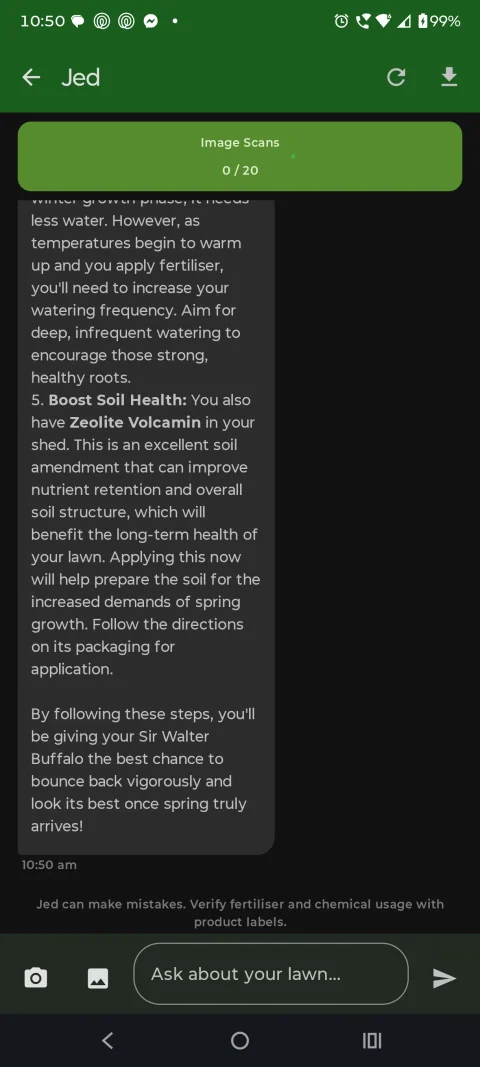
Ask JedKnows your turf, soil and shed
It reads your turf and soil
Your turf type and cultivar, your soil estimate and your climate zone (auto-detected from your postcode) all feed the answer. Advice for Sir Walter Buffalo in a humid subtropical postcode isn't the same as advice for Couch in a dry inland one, and Jed knows the difference.
It recommends what you own
Ask "what should I put on this month?" and Jed builds the plan from the products already in your shed, instead of sending you back to Bunnings for something you don't need. It explains the why, not just the what.
Three things that make the advice yours
Upload a soil test in the Android app PRO
In the Android app, on a paid plan, upload a photo of your soil test report to extract readings such as pH, NPK, organic carbon, calcium, magnesium and CEC. See each reading with its unit and reported method, plus whether it is within the cited range where a supported range is available. No test on hand? The Android app starts from modelled national soil data for your location, from the Soil and Landscape Grid of Australia (~90 m).
Use your history when you ask Jed
Your treatment log keeps the dates, products and notes you record. Check it before you apply again, and share the relevant records with Jed when you ask, by adding their details to your message.
Sprayed too much? Start here
Over-application: tell Jed the product, amount and area, and it helps you organise the details, then points you to the product label's directions and the company named on the label. In an emergency call 000; for poisoning or exposure call the Poisons Information Centre on 13 11 26.
Start free. 1 zone and 20 Jed chats in your first 14 days, then 7 a week (photos welcome in chat) are free, no card needed. On Free you enter a product's label rate by hand; saved My Shed inventory is Pro. Pro lifts it to 10 zones and up to 1,500 Jed chats a month, plus soil-test uploads in the Android app, at $149.99/yr (or $14.99/mo); Founding Member pricing is $49.99/yr (renews at $49.99/yr). Your Founding price stays the same for as long as your subscription stays active. If you cancel after Founding closes to new sign-ups (at 100 paying subscribers, all plans), it can't be restored.
Now turn "use product X" into a measured mix
Once Jed has picked the product, the calculator works out how much to mix for your zone from the label rate, no maths in the shed.