
Weather & seasons
You know the problem, you've got the exact mix; now LawnSuite helps you pick the right window. This is the turn of the loop that decides when: the day the spray actually goes on, the week the fertiliser does the most good, and the times to hold off so you don't waste the lot. Backed by live Australian weather and forecast data for your actual location.
When to go and when to hold
The cheapest mistake to avoid is spraying at the wrong time. In the Android app, LawnSuite watches conditions and gives you a clear GO, HOLD, CAUTION or RESCHEDULE call, with the reason.
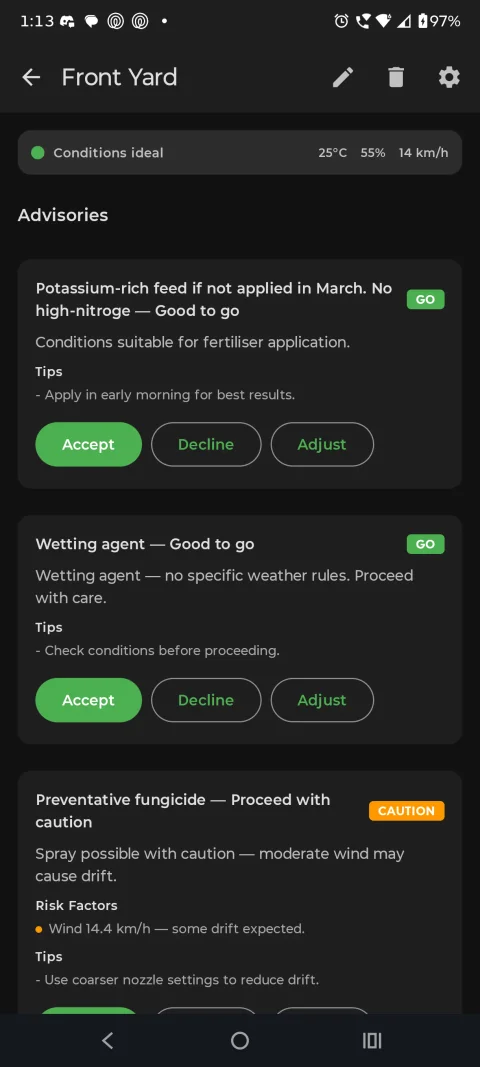
Zone DetailWeather-aware advisories
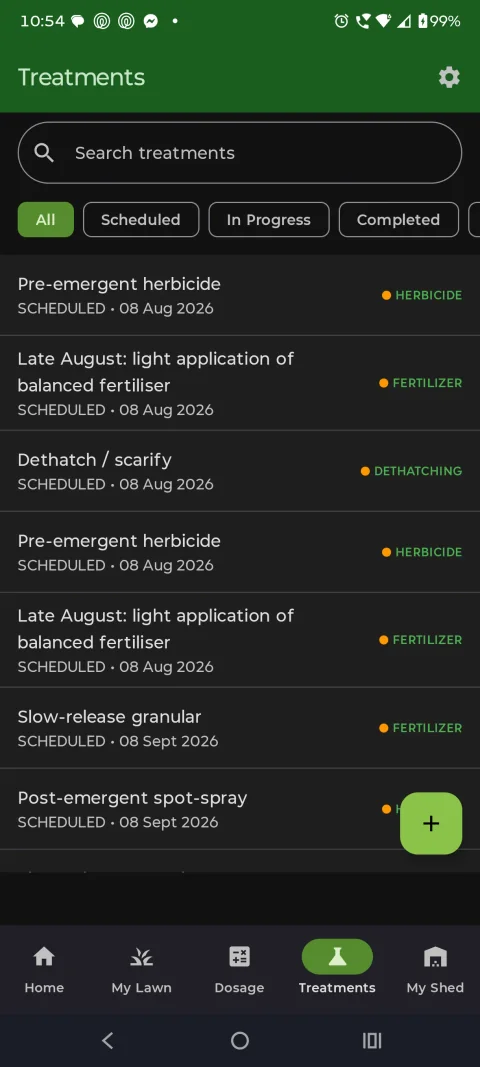
ScheduleThe right day, not just the right product
Rain holds
5 mm or more of rain forecast in the next 24 hours? Weather postponement can move an eligible scheduled fertiliser job rather than let it wash off, so the product doesn't go straight into the drain. For a spray the bar is lower: 2 mm inside the next 4 hours. Eligible jobs are weather-dependent scheduled jobs you haven't edited, in a zone with a saved location.
Wind holds
Wind of 15 km/h or more can hold an eligible scheduled spray.
Heat holds
A forecast max of 35°C or more can hold an eligible scheduled mow or fertiliser job. Cutting a heat-stressed lawn is the kind of mistake that scorches it in an afternoon.
Soil as a battery
Treat the soil like a battery that stores water and slowly drains it, so you water when it's actually needed, not on a habit.
LawnSuite tracks rainfall, evapotranspiration, the forecast and your soil type to tell you how much to water, how long, and when. Watering advice can pause when forecast rain is expected to cover enough of the estimated deficit, and on clay it builds in cycle-and-soak so the water sinks in instead of running off down the gutter. Pair it with flow calibration and a "12mm deep soak" becomes an actual number of minutes for your tap.
Your year-round program for 26 turf and climate combinations
Pick your zone and LawnSuite hands you the whole season mapped: a year-round program for 26 grass and climate combinations. Check each product's label for its rate.
26 turf-genus and climate combinations run live, so the plan fits your patch; a Buffalo lawn in the subtropics reads differently to Couch in a cool-temperate zone. When you apply a supported template, monthly jobs become dated treatments with product, method and timing guidance. Templates are reviewed against current Australian product labels and authoritative turf-management sources. The Buffalo (Warm / Subtropical) program schedules 36 jobs across the year, plus optional extras, ready to customise. Where a job says 'Per label', the rate comes from your product's label. On Pro, customise it and swap in your own My Shed product. Android sends treatment reminders for scheduled jobs; on Web, the dashboard's This Week and Overdue lists show what's due. Apply a template in one tap, or build your own from scratch and adjust it on the go.
Seasonal disease watch
Your zone's plan carries a month-by-month disease note for your turf and climate: what's worth watching for now, and what the cold or the heat is keeping in check.
Month-by-month guidance
Each month of your plan spells out mowing height and frequency, watering expectations and the jobs worth doing, so timing follows the actual season, not a guessed "every four weeks".
Start free, schedule with Pro. Set up your first zone free and you'll see your local conditions straight away. Weather postponement is included on every plan for weather-dependent scheduled jobs you haven't manually edited (needs your zone's location; on Web, tap Set exact location on the zone while at the lawn, then confirm to save the current position reported by your device). Pro adds the smart watering engine and year-round programs for 26 grass and climate combinations: $149.99/yr (or $14.99/mo), with Founding Member pricing at $49.99/yr (renews at $49.99/yr). Your Founding price stays the same for as long as your subscription stays active. If you cancel after Founding closes to new sign-ups (at 100 paying subscribers, all plans), it can't be restored.
Keep your records for the next question
Once a treatment is logged, you can look back and share its details when you ask Jed. Jed answers from your zone details, shed, equipment and last health check, and you can share any treatment record when you ask, by adding its details to your message.